

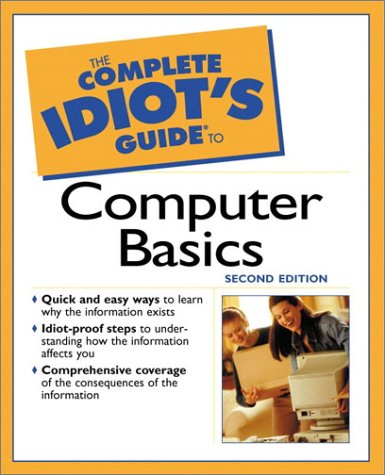
The Complete Idiot’s Guide to Computer Basics 2nd Edition by Joe Kraynak ISBN 0028642309 978-0028642307

Original price was: $50.00.$35.00Current price is: $35.00.
The Complete Idiot’s Guide to Computer Basics 2nd Edition by Joe Kraynak – Ebook PDF Instant Download/Delivery: 0028642309, 978-0028642307
Full download The Complete Idiot’s Guide to Computer Basics 2nd Edition after payment
Product details:
ISBN 10: 0028642309
ISBN 13: 978-0028642307
Author: Joe Kraynak
Simple lessons to start ‘newbies,’ or inexperienced computer users, off on the path to computer proficiency. Offers steps for setting up a computer for maximum efficiency, and for making computer use more fun and less frustrating. Explains Windows, Web surfing, and other popular computer activities. Softcover.
Table of contents:
Part 1: Firing Up Your Computer: Bare-Bones Basics
1 Setting It Up and Turning It On
Plug it in, turn it on, and tune it in.
2 Meeting Windows: Up Close and Personal
Navigate your new onscreen desktop with a mouse and
keyboard.
3 Launching Your First Program
Use your mouse to kick programs into gear.
4 Warming Up with Some Computer Games
Have fun while you learn the basics and master some free
games.
Part 2: Personalizing Your Work Space
5 Using a Cool Desktop Background
Pick a theme for your desktop and decorate it to suit your
tastes.
6 Making Your Computer Play Cool Sounds
Replace the beeps with burps, giggles, and other cool
sounds.
7 Taking Control of Your Menus and Programs
Rebuild Windows to make it work the way you do.
8 Giving Yourself More Room to Work
Stretch your desktop for a little more elbow room.
9 Installing and Removing Programs
Buy and install a new program and get rid of programs
you no longer use.
Part 3: Creating Letters, Greeting Cards, and Other Documents
10 I Just Want to Type a Letter!
Typing 101.
11 Editing and Printing Your Letter
Overhaul your text and get it on paper.
12 Designing Personalized Greeting Cards, Banners,
and Other Publications
First encounters with a desktop publishing program.
13 Creating an Address Book and Other Listy Stuff
Make lists and manage your personal records.
14 Form Letters, Mailing Labels, and Envelopes
Merge lists with documents to automate mass mailings.
Part 4: Getting Wired to the Internet
15 Connecting to the Outside World with a Modem
Get your computer its own phone.
16 Finding an Information FREEway
Get your feet wet with some free trial offers from America
Online, CompuServe, and Prodigy.
17 Sending E-Mail: Postage-Free, Same-Day Delivery
Send your first e-mail message in less than five minutes.
18 Chatting with Friends, Relatives, and Complete
Strangers
Find friends, relatives, and strangers online, and type
messages back and forth.
19 Poking Around on the Web
Use your computer and modem to connect to the Web and
experience multimedia sites online.
20 Shopping, Investing, Traveling, and Other
Cool Web Stuff
Invest, plan your vacation, shop, and research topics on
the Web.
21 Publishing Your Own Web Page in Ten Minutes or Less
Establish your presence on the Web by building your own
Web page online!
Part 5: Kids and Other Homey Stuff
22 Managing Your Finances
Computerize your checking account, manage your budget,
and track your investments.
23 Finding and Playing Cool Games
Equip your system to play the coolest games, get free
games online, and find the best tips and cheats on the
Web.
24 Tapping the Power of Educational Software
Use your computer as a library, information kiosk, and in-
teractive teaching tool.
25 Safely Introducing Your Child to the Internet
Savvy parent’s guide to protecting your child on the
Internet and exposing your child to the good stuff.
26 Making a Family Photo Album
Transform boxes of disorganized photos into a full-color,
digitized photo album.
27 Drawing Your Family Tree
Use Family Tree Maker to research your lineage and
sketch your family tree, and find the best genealogy
sites on the Web.
Part 6: Tinkering with Computer Gadgets and Gizmos
28 Playing Digitized Music Clips
Transform your computer into a jukebox, burn your own
CDs, and download MP3 audio clips off the Web.
29 Managing Your Life with a Palm Computer
Put your calendar, address book, calculator, e-mail, and
other personal information on a computer that fits in your
pocket.
30 Watching TV and DVD on Your Computer
Tune in to your favorite TV shows, play along with game
show contestants, and watch DVD videos on your com-
puter.
31 Playing Film Editor with Digital Video
Edit your home videos, enhance your recordings with
background music, and copy your production to a CD.
32 Upgrading for Voice Commands and Dictation
Look, Mom, no hands entering commands and text
without touching the keyboard!
Part 7: Maintaining Your Investment
33 Keeping Your Computer Clean
Prolong the life of your computer with some good house-
keeping tips.
34 Giving Your Computer a Tune-Up
Inexpensive maintenance utilities that can keep your com-
puter running like new.
Appendixes
A Glossary: Speak Like a Geek
B More Computer Resources for the Computer Enthusiast
Index
People also search for:
the complete idiot’s guide to computer basics
the complete idiot’s guide to computer basics by joe kraynak
the complete idiot’s guide to computer basics pdf
the complete idiot’s guide to
the complete idiot’s guide to comedy writing
Tags: Joe Kraynak, Complete Idiot’s Guide, Computer Basics